Once you've uploaded your roster from ScoutBook Plus™, you can proceed to upload the "Scout Advancement" quick export file from ScoutBook Plus. This will add completed adventures, badges, and awards to your TroopWebHostCS database.
To begin, logon to Scoutbook Plus and click "Reports" on the main menu as shown below. Then scroll down to the "Quick Export" section and click the "EXPORT" button.
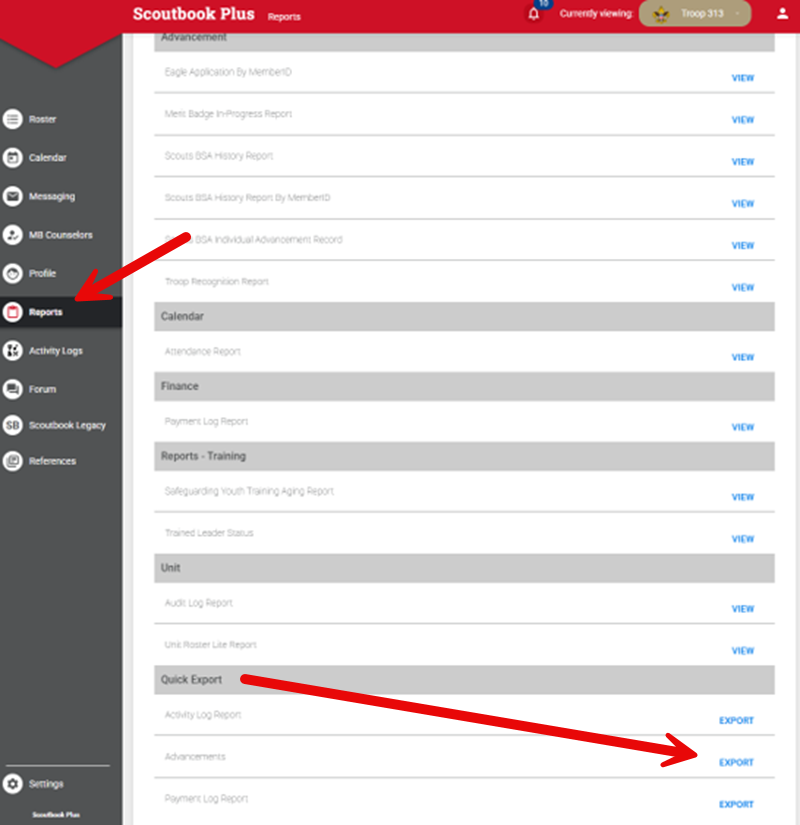
This will produce a CSV (comma separated value) text file which you can upload into TroopWebHost.
Then log on to TroopWebHost, and from the Main Menu go to Cub Scouts → Upload ScoutBook Advancement.
You should see the screen shown here:
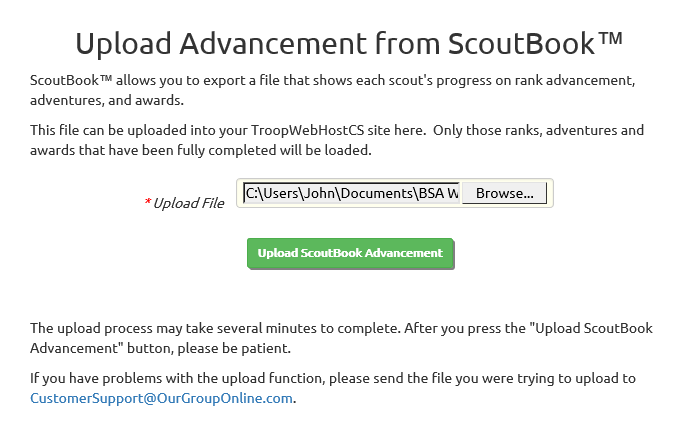
Click the Browse button to find the Scout Advancement file that you exported from ScoutBook™.
Click the Upload ScoutBook Advancement button to begin loading this data into TroopWebHostCS.
This process may take several minutes, so please be patient and do not click the button a second time.
It will only upload completed adventures, badges, and awards. It will not mark individual requirements as complete.
You may find that some awards do not transfer because the corresponding award name could not be found in TroopWebHostCS. This may be because TroopWebHostCS does not contain the award, or because the award name is spelled differently in TroopWebHostCS. In either case, you can add or update the award in TroopWebHostCS using the Awards page on the Site Configuration menu. Then load the same file again.
Any exceptions will be listed on the screen when the upload completes. Please scroll through all of the upload results and make the necessary corrections before uploading the file again.